Feature flags for mobile apps
A feature flag turns part of your app on or off for real users without a new build. Nalya brings your PostHog flags into the console, beside your crashes, so a feature that misbehaves is one tap from off.
A switch inside your app
A feature flag is an if around new code, with the answer kept on a server instead of in your build. Your app asks “is this on for this user?” and shows the new screen or the old one. Change the answer on the server, and the app follows, with no new build. Pete Hodgson’s essay on Martin Fowler’s site puts it as a way “to modify system behavior without changing code.”1
if PostHogSDK.shared.isFeatureEnabled("new-onboarding") {
  showNewOnboarding()
}if (PostHog.isFeatureEnabled("new-onboarding")) {
showNewOnboarding()
}That splits two things that used to happen together. Deploying puts the code on phones. Releasing turns it on for people. With a flag, you can ship code switched off and release it later, a slice of users at a time. Flags tend to do one of three jobs:
- Release
Hide unfinished or risky work, then ramp it up. Meant to be short-lived.
- Kill switch
Turn off a feature that is hurting users, without waiting on anyone.
- Experiment
Split users between versions and measure which one does better.
Why mobile needs flags more than the web
On the web, a bad deploy is fixed by the next deploy. A phone app has two gates in the way. The first is store review. Apple says it reviews at least half of submissions in under 24 hours and 90% in under 48.2 Google Play warns that reviews for some apps can take up to seven days or longer in exceptional cases.3
The second gate is your users. An approved update still has to land on each phone. On the App Store, a phased release spreads an update over seven days, starting with 1% of users who have automatic updates on.4 Android’s own docs note that while some people update in the background, others “might need to be reminded to install updates.”5 So for days, part of your audience is running the version with the bug.
- Fix the code
- Build
- Store review
- Users update
- Turn the flag off
- App fetches flags
The kill switch
Here is how it plays out. Say a new photo editor ships in version 3.2, behind a flag at 20%. A day later, crashes start to climb, and every crash report comes from a session where the editor was open. You turn the flag off. Users who were seeing the new editor are back on the old one, the crash rate settles, and you fix the bug in 3.3 without a deadline over your head.
How fast “off” lands depends on when your app reads its flags. PostHog’s iOS and Android SDKs fetch a user’s flags in the background each time the app opens, and cache the values on the device. Your app can also call reloadFeatureFlags() to fetch them again sooner.7 Two habits make the switch dependable:
- Check the flag where the feature starts. One check at the entry point means one switch turns the whole feature off.
- Decide what “not loaded yet” means. PostHog’s guide warns that a flag checked before its value arrives can come back empty rather than false, and that a falsy answer shouldn’t be read as off.8 For a risky feature, treat “unknown” as the old path.
Rolling out by percentage
A percentage rollout gives the feature to a share of your users and keeps the rest on what works. PostHog places each user in a bucket that comes from the flag key and the user’s ID,9 so the same person gets the same answer every launch. Nobody flickers between the old screen and the new one.
Say a new onboarding screen ships behind a flag at 20%. For a few days you compare that 20% with everyone else: crash-free sessions, how many finish signing up, what new reviews say. If it holds, you move to 50%, then 100%. If it doesn’t, you move to 0% and nobody else sees it.
A flag rollout and a store rollout are separate dials. The store decides who has version 3.2. The flag decides who, among those people, sees the new code inside it. You can use both at once.
Flags are inventory
Every flag doubles a piece of your code: the new path and the old one, both kept working. Hodgson describes how “savvy teams” treat flags as inventory with a carrying cost and keep that inventory low, and says release toggles should generally not stick around “much longer than a week or two.”10 PostHog’s guide is just as direct: “A flag set to 100% of all users with no property targeting is a flag that has finished its job.”11
- 1Ship it off
The code is in the build, the flag at 0%.
- 2Ramp
5%, 20%, 50%, watching crashes and reviews.
- 3Everyone
100%, no targeting. Its job is done.
- 4Remove it
Delete the check and the old path, then the flag.
A short list keeps stale flags from piling up:
- Name it for what it does.
new-onboardingsays more thantest-2, in your code and in your flags list. - Plan the removal when you create it. Add the clean-up task the same day, with a date.
- Remove it once it’s at 100%. Keep the winning path, delete the check and the old code, then delete the flag.
- Keep a few kill switches on purpose. A long-lived switch for a risky subsystem is fine. Just know which flags those are.
What Nalya does with your flags
Nalya doesn’t run a flag system of its own. It connects to your PostHog project and manages your PostHog flags, the same ones your app already evaluates through the PostHog SDK. Each change you make in Nalya is a change to the live flag.
- Switch and ramp
A flag that targets all users gets a rollout from Off through 5, 10, 20 and 50% to 100%. Off turns the flag off for everyone.
- New flags, gone flags
Create an on/off or multivariate flag from the console, and delete the ones you’re done with.
- A cleaner list
Flags left over from archived experiments are hidden by default, so the list shows what’s live.
- Every change logged
Each switch, ramp, new flag and deletion made in Nalya is written to its Activity log.
Some flags stay in PostHog’s hands. A flag with custom release conditions, such as targeting by a user property or a cohort, gets an on/off switch in Nalya, while its conditions stay in PostHog. A flag that belongs to a running experiment is managed by that experiment.
Crashes and flags, side by side
A kill switch is only as fast as your hunch about which flag to flip. Nalya keeps both halves in one place. Issues ranks crashes by how many users each one hurts and shows when it was first seen. The Flags screen shows when each flag last changed. When a spike starts right after a flag moved, you can line the two up and switch that flag off from the same console.
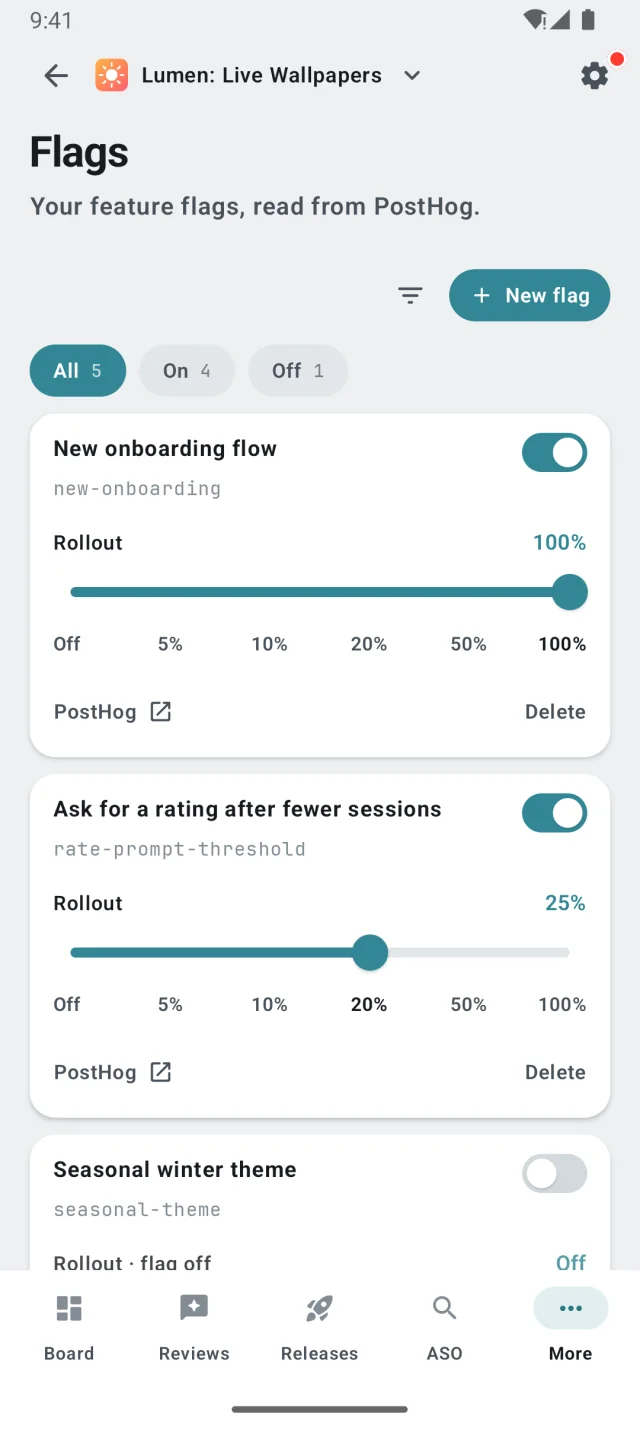
The flags are in Nalya’s MCP server as well, so you can ask which flags are on, and at what rollout, from your editor.
What you need
- PostHog in your app. Your iOS and Android apps check flags through the PostHog SDK, so a change reaches users without a store review.
- A PostHog connection in Nalya. Connect the project once, and the Flags module reads and writes its flags.
- The feature already in the build. A flag can hide or show code that shipped. It can’t add code that didn’t.
- Pete Hodgson, Feature Toggles (aka Feature Flags), martinfowler.com, 2017. ↩
- Apple, App Review: “typically reviewing at least 50% of submissions in less than 24 hours and 90% in less than 48 hours.” ↩
- Google Play Console Help, Publish your app: review times “of up to seven days or longer in exceptional cases.” ↩
- App Store Connect Help, Release a version update in phases: 1%, 2%, 5%, 10%, 20%, 50% and 100% of users with automatic updates on, over seven days. Anyone can still download the update manually. ↩
- Android Developers, In-app updates. ↩
- Apple, App Review Guidelines, 2.5.2 (apps may not “download, install, or execute code which introduces or changes features or functionality of the app”) and 2.3.1(a) (new features “must be described with specificity in the Notes for Review”). ↩
- PostHog, iOS and Android SDK docs, feature flags. ↩
- PostHog, Feature flag best practices: “Don’t assume that a falsy return means the flag is off.” ↩
- PostHog, Creating feature flags: “a user’s bucket comes from the flag key and their identifier.” ↩
- Hodgson, Feature Toggles, on release toggles and on managing the carrying cost of toggles. ↩
- PostHog, Feature flag best practices. ↩